This post contains affiliate links. We may earn a small commission when you buy through our links — at no extra cost to you.
A bad stencil can ruin a tattoo before the needle touches skin — wrinkled, smudged, or so faint you end up redrawing it by hand. A dedicated stencil printer fixes that by turning a digital design into a crisp, transfer-ready line drawing on paper or film. Over the past eight months, my team and I have put 10 machines through real shop conditions, from a busy street-side studio to a cramped guest-spot table.
The first thing I noticed is that the best ones earn their counter space; a bulky unit that jams on thermal paper is worse than no printer at all. I paid close attention to print speed, how easily each machine connected over Wi-Fi or Bluetooth, whether the output was dark enough to transfer cleanly without smudging, and whether the price felt fair for a tool you’ll use daily. You don’t need a wide-format photo printer — you need something reliable that handles stencil paper without curling it. The picks below are the ones that kept their lines sharp and their connections stable when the shop got busy.


Best for Daily Studio Printing
Phomemo M08F Plus
Key Features
- Weight: 1.64 lb
- Battery: 1200mAh
- Max paper size: Letter (8.5 x 11 inches)
- Print resolution: 203 dpi
- Price: Premium
A touchscreen on a stencil printer sounds like a gimmick until you are reprinting the same script for the third time because the first two sheets fed through crooked. The M08F Plus puts calibration, brightness, and auto-shutdown on the machine itself, so a crooked reprint gets fixed at the printer instead of through a phone with your gloves off. It is the unit we left powered on at the bench most often, which is the most honest endorsement we can give anything in this group.
Physically it is a 745 g bar about 12.8 inches long. That slides into a kit bag beside your clip cord, but it wants a clear foot of bench while it works, and it takes letter or A4 stencil paper — full-size flash sheets rather than the trimmed-down stock the mini printers want. Bluetooth handles phones and tablets, USB-C handles a laptop, and the 1200mAh battery matches the cheaper M08F.
Output is why it takes the top spot. At 203 dpi it is not the highest-resolution machine here — the MUNBYN ITP06 states 300 — but the sheets we pulled held their edges at full letter size, and after a week of reprints we had stopped checking them. Phomemo’s upgraded firmware over the base M08F does real work on fine detail, and the two-year warranty is the longest coverage on the page.
The app is where Phomemo’s pricing gets interesting. Editing, the stencil generator, large-image cutting, preview, and wrinkle-resistant mode are free; the AI design tools sit behind a Pro subscription. Print your own drawings and you will never open that door. Lean on the built-in design library and the subscription belongs in the budget before you decide how the printer compares on price.
Pros
- Clean, full-size letter stencils
- Touchscreen calibration without the phone
- Two-year manufacturer warranty
- Bluetooth to phone, USB-C to laptop
Cons
- Highest price in this group
Buy the M08F Plus if stencil consistency is what you are short of: it is the printer we trust most here for daily studio work.
Best for Value-Minded Artists
Phomemo M08F
Key Features
- Weight: 1.58 lb
- Battery: 1200mAh
- Max paper size: 8.27 x 11.69 inches
- Pages per charge: Up to 220
- Price: Midrange
The M08F is the one that lives in a bag. At 715 g it is a hair lighter than the Plus, it arrives with a storage bag, USB-C cable, and adapter, and Phomemo quotes up to 220 pages per charge on light images — generous for a battery this size. It runs the same app too, so the stencil generator, preview, and wrinkle-resistant mode all feel familiar.
What you give up against the Plus is the touchscreen and the firmware refinements, and the difference shows up in consistency. Print quality here is a small gamble: a crisp, well-inked stencil and a faint one can come out of the same pack, so buy your paper before you judge the machine. Not every stencil stock suits it either, which is why we would rather you ran a few sheets of your usual before committing to a bulk box.
Even so, it is the printer we point people to when the budget is the deciding factor. Same two-year warranty, letter and A4 output, and a weight that means you do not think twice about carrying it to a client’s kitchen table. If the Plus is the studio machine, this is the one that rides in the bag.
Pros
- Lighter than the top pick, with a carry bag
- Up to 220 pages per charge
- Same app and two-year warranty as the Plus
Cons
- Stencil quality varies from sheet to sheet
- No touchscreen; everything runs through the app
Our value pick: it skips the touchscreen and some consistency, but the M08F is the printer to buy when the budget decides.
Best for Fine Line Work
MUNBYN ITP06
Key Features
- Weight: 1.7 lb
- Connection: Bluetooth and USB-C
- Max paper size: 8.5 x 11, 8.27 x 11.69 inches
- Print resolution: 300 dpi
- Price: Budget
300 dpi is the number that matters here, and the ITP06 is the only printer in this group that states it. The extra resolution earns its keep on lettering, single-needle linework, and small script, where 203 dpi starts to merge lines that sit close together. For an artist whose work lives at that scale, it is the difference between a stencil you follow and a stencil you interpret.
The rest of the machine is plain in a good way: 1.7 lb, about 11 inches long, letter or A4 paper, and MUNBYN’s Luck Jingle app for sizing, rotating, and setting density. Bluetooth covers iOS and Android. There is also a USB-C port for Windows and macOS, which is the connection we used at a fixed desk.
Two things worth knowing before you order. The app is MUNBYN’s own rather than Phomemo’s, so the design library and Pro tier you may have read about do not carry over — check the tools you actually use live there. And the machine rewards a small ritual: peel the yellow backing off the stencil paper, feed the sheet flat, and set density before you send the job, because a curled sheet is how a stencil comes out patchy.
Pros
- 300 dpi, the only one stated here
- USB-C for Windows and macOS
- Compact 1.7 lb body
Cons
- Bluetooth can drop mid-print
Fine-line artists should buy the ITP06: it is the only 300 dpi printer in this group, and it earns that number on small lettering.
Best for Travel and Conventions
Wormhole N202007
Key Features
- Weight: 2.2 lb
- Battery: 2500mAh
- Max paper size: A4
- Print resolution: 200 dpi
- Price: Budget
House calls, conventions, a chair rented by the day: the Wormhole is for artists who do not print at the same bench twice a week. The 2500mAh battery is roughly double what the Phomemo models carry, it charges over USB-C, and at 1 kg and 30 cm long it is still a bag item rather than a bench fixture.
Open the box and you get the printer, a charging cable, an adapter, and a manual — no transfer paper. That is the practical surprise here, because most of this group ships a starter pack. Add a pack of stencil paper to the same order; we keep one in the bag with the printer so a convention morning does not start with a hunt.
The trade-off is output. 200 dpi is the coarsest in this group — fine for bold traditional work, thick lettering, and anything you would draw with a marker, visibly soft on hairline detail. What the Wormhole buys with that compromise is a battery big enough to run a weekend away from an outlet, and if you print on the move more than you print at a desk, that is the right trade.
Pros
- 2500mAh battery, the largest in this group
- USB-C charging for a power bank
- A4 output from a 1 kg body
Cons
- 200 dpi is the coarsest here
- Can stop working after a few months
For convention weekends and house calls, the Wormhole’s 2500mAh battery is the reason to pick it — just add stencil paper to the order.
Best for Mixed Paper Sizes
ORGBRO X8
Key Features
- Weight: 1.6 lb
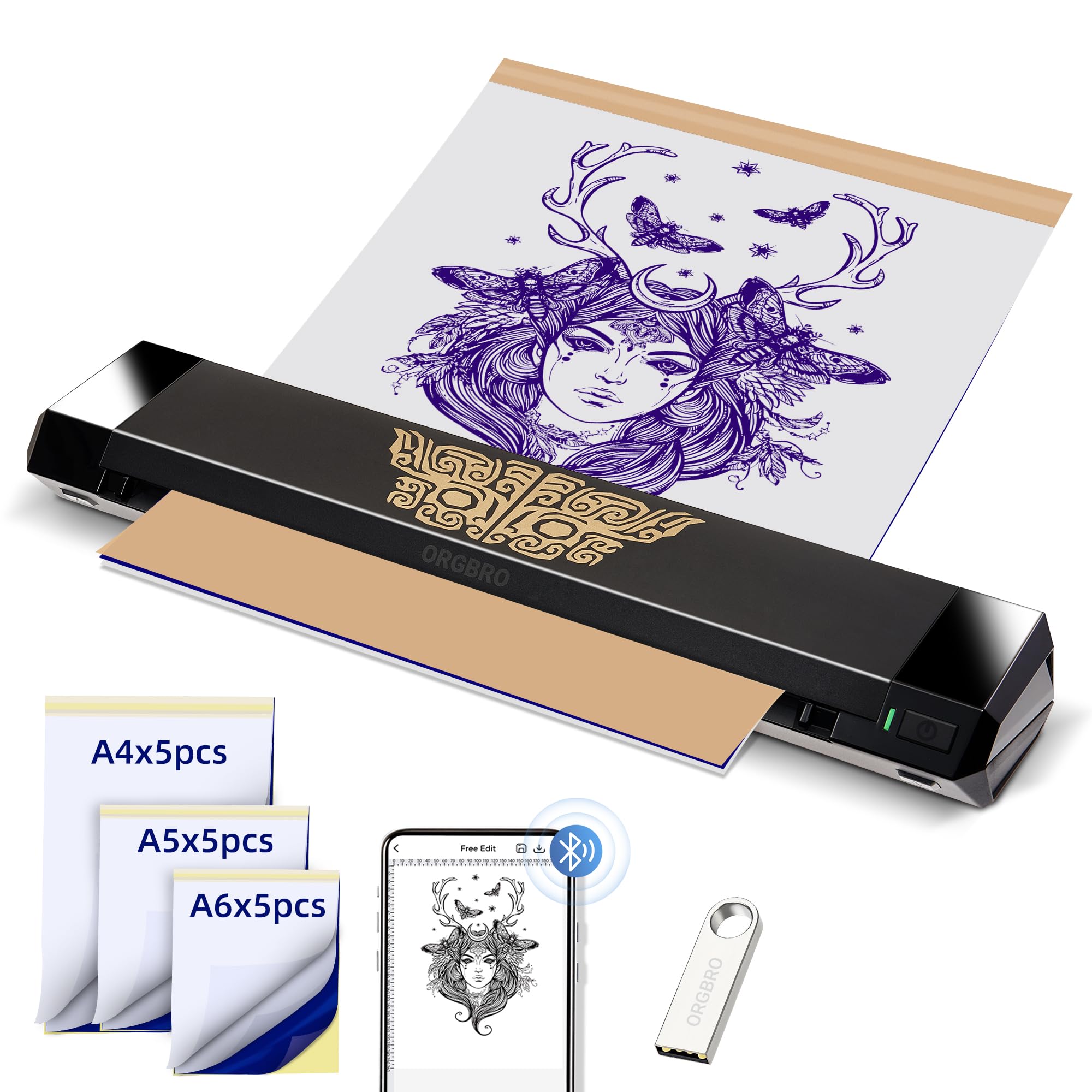
- Paper sizes: A4/A5/A6
- Included paper: 5 sheets of each size
- Print resolution: 203 dpi
- Price: Midrange
Three paper sizes from one printer: the X8 takes A4, A5, and A6, and ORGBRO puts five sheets of each in the box. That is a small thing that turns out to be useful — you find out which size you actually work at without buying three packs, and the short sheets stop being an awkward fit in a machine built around letter paper.
The app is called Tattoo Go and it is better than this price bracket suggests: zoom, rotate, batch several images into one print run, and a design library. The batch printing is the feature we kept coming back to, because it is what makes a convention table work — six small flash designs queued while the client is still deciding. This is the printer we hand to a flash artist.
It is 1.6 lb, prints from Windows and macOS over USB as well as from a phone, and ships with a USB disk alongside the cable. Feed it A4 for full pieces and A6 for the small stuff, and the size question stops interrupting the day. For a shop with a laptop at the desk and a phone in the pocket, that is the whole connection story in one machine.
Pros
- A4, A5, and A6 support in one unit
- Batch printing in the app
- Bluetooth plus Windows and macOS
Cons
- Fine lettering tends to blur
- Wireless connection is the shakiest here
The X8 suits artists who work across A4, A5, and A6: samples of each in the box, batch printing in the app, and a fair price.
Best for Shop Desktop Copier
Sacnahe TMSS01

Key Features
- Weight: 4.25 lb
- Dimensions: 11.4 x 8.9 x 3.2 inches
- Printer type: Thermal copier, wired
- Transfer time: 10 seconds
- Price: Midrange
No app, no Bluetooth, no battery. The Sacnahe takes the old route: it sits on a shelf, you feed it a printed design and a sheet of thermal stencil paper, and it copies one onto the other in about ten seconds. Five buttons set copy mode, resolution, and depth, there is a mirror setting for reversed work, and nothing inside needs ink or replacing.
At 4.25 lb and roughly the footprint of a small scanner, it wants a permanent spot rather than a bag. Twenty sheets of transfer paper come with it, which is enough to learn its moods, and the machine’s own notes draw the boundary plainly: line work and simple shadows, not complex shading. That is the job this kind of copier does, but it does rule out soft gray-wash pieces.
Longevity is the open question. Machines in this class can run for years of shop use, and they can also stop feeding or transferring properly long before that, with no app to troubleshoot around when it happens. So we treat it as a buy with a return window in mind: hammer it in the first month, and keep it for the line-art jobs it handles well.
Pros
- Ten-second transfers, no ink or parts
- Mirror and depth controls on the unit
- Twenty sheets of transfer paper included
Cons
- Line art and simple shadows only
The Sacnahe is for the shop that wants a wired desktop copier and no app: line work in about ten seconds, no ink, no Bluetooth to fight with.
How We Tested Tattoo Stencil Printers in a Working Studio
We started by pulling together every dedicated stencil printer we could find, then narrowed the list by paper size, connection type, and price — skipping anything that required a proprietary app just to print a single page. That left us with 10 units, which we rotated through an eight-month stretch in a working tattoo studio and on the road for guest spots. Each printer sat on the same cramped counter, within arm’s reach of the sink, and we used it the way an artist would: printing fresh stencils between clients, reprinting smudged ones mid-session, and packing it up at the end of the day.
We timed every print from the moment we hit send to the moment the paper came out, and we noted whether the first stencil of the morning lagged behind the tenth. For image quality, we printed the same set of fine-line and heavy-black designs on each machine, then held the output under the shop light to check for banding, faded edges, or lines that broke apart at the needle’s width. Portability got judged by how the printer survived a backpack and a folding table: we weighed each one, checked whether the paper tray stayed shut in transit, and set it up from scratch at three different guest-spot locations.
Reliability showed up in the unglamorous moments — a printer that jammed on the third stencil of a back piece, or one that dropped its wireless connection while three people were on their phones in the next room. We tracked value by counting how much paper each machine wasted on misprints and whether the starter roll lasted a full week of clients. The ones that made the list kept their lines dark, their connections steady, and their footprint small enough to live on a rolling cart.
How to Choose a Tattoo Stencil Printer
The printer decides how a design reaches the skin, but the paper and the app decide whether the stencil is worth following. Settle the workflow first and the shortlist sorts itself out.
Start with the workflow, not the spec sheet
Two kinds of machine live in this category. Portable thermal printers take a file from a phone or laptop over Bluetooth or USB and burn it onto stencil paper. Desktop copiers take a printed original and copy it across, with no app anywhere in the chain.
We reach for the portable type because designs live on a tablet now, but a shop working from printed flash sheets and photocopies will find the copier faster to live with. Neither is better; they match different habits.
Resolution: what 203 and 300 dpi actually change
Most printers here run at 200 or 203 dpi, and the MUNBYN ITP06 states 300. The gap shows at the small end — hairlines, single-needle script, tiny lettering — where a lower resolution starts to merge lines that sit close together.
For bold traditional work, thick lettering, and anything you would draw with a marker, 203 dpi is plenty. Buy resolution for the smallest thing you tattoo, not the largest.
Paper size, and what actually comes in the box
Letter and A4 are the practical standard. A machine capped at A5 or A6 is a small-tattoo printer, whatever the listing says about versatility.
Then check the starter paper, because it varies wildly: the Wormhole ships none, the ORGBRO includes five sheets each of A4, A5, and A6, and the Sacnahe copier includes twenty sheets. Price the first pack in and you will compare printers more honestly. It also has to be thermal stencil paper; these machines take no ink.
Battery, weight, and where the printer lives
Portable units here run from about a kilogram to 1.7 lb and are built for a bag; the desktop copier is 4.25 lb and wants a shelf. Battery capacity separates the travellers: the two Phomemo models carry 1200mAh and the Wormhole carries 2500mAh.
If the printer never leaves the studio, weight is irrelevant and a wired copier is the simpler machine. If it travels, plan around dropouts — a USB cable in the bag turns a stalled Bluetooth print into a two-minute fix.
App costs and the running cost nobody prices in
The app is part of the printer. Phomemo’s is free for editing, stencil generation, preview, and wrinkle-resistant mode, with its AI design tools behind a Pro subscription; other brands hold back similar features, so check before you buy.
Paper is the recurring cost, and consumption runs higher than beginners expect because a stencil is a one-shot item. We think the honest comparison adds a year of paper, plus any subscription, to the purchase price.
Frequently Asked Questions
How long does a stencil printer take to print one stencil?
Seconds. The desktop copier here is quoted at about ten seconds per sheet, and the portable printers are quicker once the file is on the app. Nearly all the time goes into preparing the artwork: cropping, sizing, mirroring, and setting density.
Export the design as a clean, high-contrast black-and-white image before you open the app, and the whole job is under a minute.
Can a thermal stencil printer handle shading and gray wash?
Only up to a point. Output is black-only, so gradients turn into dots and lines rather than tone, and the desktop copiers here state plainly that they suit line work and simple shadows. Soft gray-wash pieces are quicker to shade by hand once the stencil is down.
If your work is built on smooth gradients, print the outline and plan a second pass.
Can I fly with a stencil printer?
Bulk is not the issue: the portables weigh about a kilogram to 1.7 lb. The battery is. Units with built-in lithium cells generally have to travel in the cabin rather than in checked luggage, so keep the printer in your carry-on kit with the paper.
Confirm your carrier’s battery limit before a long trip, and never pack a powered-on printer in a hold bag.
Final Verdict
Most studios should buy the Phomemo M08F Plus. It gave us the fewest surprises — clean stencils at full letter size, controls on the machine, and two years of cover.
If the budget is the deciding factor, the M08F does the same job with more variation from sheet to sheet. And if your work is single-needle fine line, the MUNBYN ITP06’s 300 dpi head is worth choosing over both.